Continuous Collision Detection as a Visual Effect
Continuous Collision Detection
Physics engines are widely used in games and simulators. These engines simulate an environment in a discrete manner: at a given time , they compute the state of the environment (that is, the position and velocities of all objects) at the next time , where is a small, usually fixed, time step. This process is repeated until the desired duration has elapsed or the simulation is otherwise ended.
One of the physics engine’s main tasks is collision detection; that is, checking if two objects are in contact or overlapping after each time step. For simple shapes like circles and spheres, conditions for collision can be easily derived by hand; for more general shapes, there are many interesting collision detection algorithms like SAT, GJK, and EPA.
However, what if the collision occurs during a time step? For example, consider the shapes in Figure 1 below. The circle (red) is moving with constant velocity toward the stationary wall (blue). As we can see, the circle should collide with the wall during the time step between times and , but the two shapes are not colliding at times or . This means that if we only check for collisions at these discrete instants in time, we would miss the collision entirely. This phenomenon is called tunnelling, and is more likely to occur with objects that are thin and/or moving quickly.
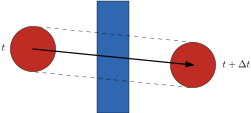
Figure 1: A circle (red) tunnelling through a wall (blue) during the time step between times and .
The solution is continuous collision detection (CCD), in which we check for overlap between the swept areas (or swept volumes, in 3D) of the two objects over the time step. That is, we don’t just look at where the objects end up, but at all of the space they pass through over the time step. Figure 2 shows the swept area of the circle from Figure 1, which does overlap with the wall. Having computed the swept areas, we can use any of the algorithms mentioned above to check for a collision between them.
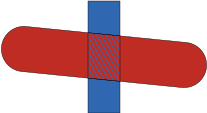
Figure 2: The swept area of the circle from Figure 1, which overlaps the wall in the hatched region.
When a collision is detected between two swept areas, we typically also want to compute exactly when the collision occurred during the time step, so that behaviour can be adjusted accordingly. For example, at the instant of collision between a ball and a wall, we may reverse the ball’s direction (normal to the wall) to simulate a bounce. We won’t get more into calculating collision time in this post, but you can read more about CCD in games here and here and in robot motion planning here. I also described a form of CCD I used in a research paper in this previous blog post.
As a Visual Effect
Last year I had some fun making a little browser-based game called Saber, in which the player swings around a lightsaber to destroy bouncing balls (if you haven’t played it before, I encourage you to go do so now—it’s fun and will make the rest of this post easier to follow). The saber itself is essentially a thin line segment which can move quite fast, so CCD is needed to reliably detect collisions between it and the balls.
However, the swept area of the saber is not straightforward to compute exactly. Indeed, since the saber experiences both linear and angular motion, the swept area may not even be a convex shape (convexity generally makes collision detection easier). Therefore, to simplify things, I just approximated the swept area over each time step as a quadrilateral (i.e., a four-sided polygon), as shown in the examples in Figure 3 below (the figure is animated—press the small play button in the bottom left corner).
Figure 3: Two swept areas of line segments moving with both linear and angular velocity (the linear velocity is the same in both cases but the angular velocity differs). The line segment starts oriented vertically (coloured blue) and transitions to red as time progresses. The quadrilateral approximation of the swept area is outlined in black. Press the play button to watch the areas get swept out over time.
As a collision detection method for the game, the quadrilateral approximation works well. While it may result in spurious detections for non-convex swept areas like the one on the right side of Figure 3, I haven’t really noticed this during gameplay. And besides, tunnelling would be far more jarring than a slightly conservative collision shape.
What I didn’t realize is that this application of CCD also produces a really cool visual effect (in my opinion) if the swept area is drawn at each time step: it looks like the light trail left by a swinging lightsaber, hence the name of the game. You can play with an interactive demo of this effect in Figure 4 (but you should also just go play the game).
Figure 4: Interactive demo of the CCD light trail effect. Move your mouse to the saber’s hilt (black) to start moving it around. Use the checkbox in the bottom left corner to enable or disable the light trail.
Thanks to Galen Leir-Taha for reviewing a draft of this post.